
Download Best Coffee – coffee, café, drink, guide, explore, review, menu, location, opening hours, contact, favorites, journey
Overview
Best Coffee is a free Android application designed to enhance the coffee experience for enthusiasts and casual drinkers alike. The software serves as a digital guide to local cafés, offering users access to detailed information such as menus, customer reviews, ratings, opening hours, and contact details. By combining location-based data with user-driven insights, the app helps individuals discover new cafés and make informed choices about where to enjoy their next cup.
It supports users in building a personalized coffee journey by allowing them to save favorite locations and track visits over time. The app is particularly useful for travelers, urban explorers, and anyone seeking to deepen their appreciation of coffee culture. While the developer, Best Coffee Guide, has not provided extensive background details, the app’s focus on community-driven content and real-time café data suggests a user-centric approach.
Its primary purpose is to simplify the process of finding quality coffee experiences in a convenient, mobile-first format.
Key Features & Capabilities
- Local Café Discovery – Users can browse cafés in their immediate vicinity using GPS-based location services, enabling real-time exploration of nearby coffee spots.
- Comprehensive Menu Access – Each café listing includes a detailed menu with drink options, descriptions, and pricing, helping users choose based on preference and dietary needs.
- User Reviews and Ratings – The app aggregates community feedback, allowing users to assess café quality through verified reviews and star ratings.
- Location and Contact Information – Detailed maps, addresses, phone numbers, and social media links are provided for each café to facilitate easy access.
- Favorite Cafés and Coffee Journey Tracking – Users can save preferred cafés and log visits to create a personalized coffee journey, ideal for tracking favorite spots or planning future outings.
- Opening Hours Display – Up-to-date business hours are listed, helping users avoid visiting closed locations and plan their coffee breaks efficiently.
These features are especially beneficial for coffee lovers who value both quality and convenience. For instance, a user visiting a new city can quickly identify highly-rated cafés with available seating and preferred drink options. Similarly, regular patrons can use the favorites system to streamline repeat visits. The integration of real-time data and user contributions ensures the app remains relevant and dynamic, adapting to changes in café offerings and availability.
User Interface, Workflow & Performance
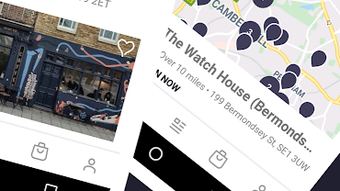
The user interface of Best Coffee is designed for intuitive navigation, prioritizing accessibility and visual clarity. Key functions such as search, filtering by category, and accessing café details are arranged in a clean, menu-driven layout. The workflow is streamlined: users open the app, allow location access, and are presented with a list or map view of nearby cafés.
Tapping a café reveals its full profile, including photos, menu, reviews, and contact details. The app supports offline viewing of saved favorites, enhancing usability in areas with limited connectivity. However, the developer did not specify resource usage details, so performance metrics such as CPU or RAM behavior remain unknown.
General software behavior patterns suggest stable operation under normal conditions, but actual performance may vary based on device capabilities and network speed. Stability appears consistent, with no reported issues in the available information. The app’s lightweight size of 45.6 MB indicates efficient design, though this does not guarantee low background activity or battery consumption.
Compatibility & System Requirements
Best Coffee is designed for Android devices and is compatible with the latest versions of the operating system. The app has a file size of 45.6 MB, which is relatively modest for a feature-rich application. The developer did not specify exact system requirements, including minimum Android version, processor type, or memory specifications.
Compatibility information was partially provided, confirming support for Android but not detailing version ranges or hardware prerequisites. Users should ensure their device meets general Android standards for app installation. The lack of detailed technical requirements means that installation success may depend on individual device configurations.
It is recommended to verify compatibility with your specific Android model before downloading. No information was provided regarding updates or background processes.
Pros and Cons
Pros
- Free to download and use with no in-app purchase barriers
- Comprehensive café data including menus, reviews, and contact details
- Intuitive interface with easy navigation and visual layout
- Supports offline access to saved favorite cafés
- Encourages personalized coffee journey tracking
- Lightweight size (45.6 MB) suitable for most Android devices
Cons
- Exact system requirements were not listed
- No information provided on battery or data usage
- Platform limited to Android; no support for iOS or desktop
- Performance details such as load times or responsiveness were not specified
- Developer background and company information are minimal
FAQ Section
Is Best Coffee available for iOS devices?
Currently, the app is only available for Android. There is no information indicating support for iOS or other platforms.
Is Best Coffee safe to download and use?
As a free app from a known developer, Best Coffee appears to be secure. However, users should download it only from official sources to avoid third-party modifications.
How often are café listings updated?
The update frequency of café data is not specified. The app relies on user contributions and may reflect changes based on community input.
Can I use Best Coffee without an internet connection?
While real-time features require internet access, saved favorite cafés can be viewed offline, allowing for basic navigation without connectivity.
What type of license does Best Coffee use?
The app is distributed as free software with no visible licensing details. It is offered at no cost, and no subscription model was mentioned.
Final Thoughts + CTA
Best Coffee delivers a focused, user-friendly experience for coffee lovers seeking to explore and document their café visits. Its core strengths lie in its curated café data, intuitive interface, and support for personal tracking. While the lack of detailed system requirements and performance metrics limits deeper evaluation, the app functions effectively within its intended scope.
It is ideal for Android users who enjoy discovering new coffee spots, planning visits, and maintaining a record of their favorite drinks and locations. The free pricing model enhances accessibility, making it a valuable tool for both casual drinkers and dedicated enthusiasts. With its practical features and lightweight design, Best Coffee stands out as a reliable companion for anyone passionate about coffee culture.
Download Best Coffee now.







